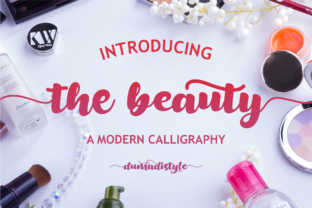
The Beauty: A Cute Handwritten Font Full of Charm
Every once in a while, a font comes along that feels like it was crafted just for the joy of creating. The Beauty is exactly that — a cute and modern handwritten script with a personality so warm, it turns everyday text into something special. Its letters flow with a natural, approachable rhythm, making it perfect for anyone who wants to add a friendly, human touch to their designs. Whether you’re designing wedding invitations, sprucing up an Instagram quote, or making a personalized gift, this font brings effortless style to the table.
What sets The Beauty apart is how it balances charm with practical versatility. The overall look is playful yet polished, with just the right amount of bounce and character to feel authentic. It never looks stiff or overly formal — instead, it carries an inviting, almost handwritten-by-a-friend quality that puts people at ease. That sense of comfort is something many designers, small business owners, and hobbyists actively look for when they want their projects to feel genuine.
A Closer Look at The Beauty’s Character
At its core, The Beauty is a script font that leans into a modern, casual handwriting style. The letterforms are rounded and soft, with a consistent weight that holds up well across different sizes. Unlike some scripts that can feel too delicate or hard to read, this one stays clear and legible, even when used in longer phrases. The lowercase letters are particularly expressive, often connecting in a way that mimics real pen strokes, while the uppercase characters stand out with a bit of flair without overwhelming the design.
One of the font’s most striking features is the collection of gorgeous swashes and ligatures woven throughout the character set. Swashes are those elegant extended strokes that curl off certain letters, giving your text an artful, calligraphy-inspired finish. Ligatures, on the other hand, are special character combinations that replace certain letter pairs with a single, beautifully connected glyph. This means that common pairs like “th,” “en,” or “ch” appear in a way that looks completely natural — as if a professional calligrapher wrote them by hand. Together, these details elevate The Beauty from a simple font into a flexible design tool that can suit both playful and refined projects.
Another huge advantage is that the font is PUA encoded. In practical terms, this means all those extra swashes, alternates, and special glyphs are accessible without needing advanced design software. You can use them in programs like Silhouette Studio, Cricut Design Space, Adobe Illustrator, Photoshop, Procreate, or even Microsoft Word — if the application supports OpenType features or a glyph panel, you’re all set. It’s a beginner-friendly detail that makes the full range of the font’s personality easy to reach.
Where The Beauty Shines Brightest
Because of its friendly and versatile nature, The Beauty fits into a wide array of creative projects. It fills that gap between completely formal calligraphy and overly casual marker-style lettering, giving you a middle ground that feels professional yet approachable. Here are some of the most popular ways creators use it in their everyday work:
- Social media graphics and branding: Instagram quotes, story templates, Pinterest pins, and TikTok thumbnails get an instant warmth boost. The soft handwritten style helps content feel more personal and less like a generic template.
- DIY projects and crafts: Whether you’re making custom mugs, tote bags, or scrapbook pages, the font’s swashes and ligatures add a hand-crafted look that elevates simple items into keepsakes. It’s a favorite for Cricut and Silhouette users because the clean cut lines transfer beautifully onto vinyl or cardstock.
- Wedding and event stationery: Invitations, place cards, menus, and thank-you notes gain a romantic, modern elegance. You can mix the font’s regular characters with swash alternates to create a bespoke feel without hiring a calligrapher.
- Logo design and small business packaging: Boutique shops, bakeries, beauty brands, and photography studios often need a logo that feels hand-lettered but remains consistent. The Beauty delivers that signature look while being easy to trademark and reproduce across labels, boxes, and websites.
- Digital products and printables: From habit trackers and planner stickers to digital wall art and Etsy downloads, the font’s readable yet decorative nature makes it a go-to for sellers who want to give their products a polished but inviting style.
What makes these applications work so well is the font’s ability to adapt with the help of alternate glyphs. Instead of repeating the same letter shape over and over, you can swap in different versions of a character to make the text look more organic. For example, the lowercase “t” might have a crossbar that extends into a decorative loop, while a second alternate tucks it in neatly. Swapping these out as you typeset allows each word to feel truly custom — something that matters a lot when you’re working on a one-off piece like a gift tag or a header for a blog post.
How to Access All the Glyphs and Swashes
If you’ve never used a PUA encoded font before, you might be surprised at how straightforward the process is. PUA stands for Private Use Area, which is a dedicated section of Unicode where font designers place all the extra characters that don’t fit on a standard keyboard. Once you install the font, these hidden treasures are already loaded — you just need to pull them up.
On a Mac, you can open Font Book, select the font, and browse all its glyphs. On Windows, the Character Map tool does the same job. Many design apps also have their own glyph panels; Adobe Illustrator’s Glyphs window, for instance, lets you see every alternate and ligature in one glance. Even in word processors like Pages or Word, you can often insert symbols or use advanced typography settings to access these characters. The initial setup takes only a minute, and from then on, you have the full creative power of the font at your fingertips.
It’s also worth noting that many crafting software programs, like Cricut Design Space, allow you to copy and paste special characters directly from a character map. This means you don’t need to master complex shortcuts — simply find the swash or alternate you like, copy it, and paste it into your text box. That ease of use is a big reason why beginners and busy creators keep coming back to The Beauty.
What to Consider Before Using The Beauty
While The Beauty is incredibly flexible, a few practical points will help you get the most out of it. First, because it’s a script font with connecting letters, it works best for headlines, short phrases, or decorative accents rather than long paragraphs of body text. Using it for an entire blog post or a multi-page document can reduce readability — so pair it with a clean sans-serif or serif font for the main content. Think of it as the star of your design, not the supporting cast.
Next, keep contrast in mind. The delicate strokes of the swashes and some of the thinner alternate characters can get lost against busy or similarly light backgrounds. When you’re placing text over a photo or patterned background, a subtle drop shadow, a shape behind the text, or a slightly darker overlay can preserve those beautiful details. It’s a small step that makes a huge difference, especially on social media where images are viewed on smaller screens.
Licensing is another important factor. Like any premium font, The Beauty often comes with specific terms for personal and commercial use. If you plan to use it on products you sell, in client logos, or for large-scale commercial campaigns, make sure you have the appropriate license. Most independent font creators offer clear options, and a proper license protects both you and the designer. It’s always a good idea to read the terms before embedding the font in a digital product or using it as part of a brand identity.
Finally, take a little time to play. Because there are so many alternates and ligatures, you might discover that certain combinations give off completely different moods. Swapping a simple “r” for a swash-heavy version can add a playful bounce, while using a more restrained alternate keeps things elegant. Experimenting with these variations not only sharpens your eye but also helps you understand how to craft the exact feel you want for each project.
Bringing It All Together
The Beauty is more than just a cute font — it’s a tool that expands what you can create with just a few clicks. Its handwritten warmth, combined with the sophistication of swashes and ligatures, bridges the gap between casual DIY charm and professional polish. For the Instagram content creator, the Etsy seller, the wedding planner, or the small business owner who wants branding that feels both modern and personal, this script delivers time after time. The PUA encoding and accessible alternate glyphs remove the technical barriers, inviting anyone — regardless of experience — to craft pieces that truly feel like art.
Whether you’re making a single heartfelt card or designing a whole line of products, the friendly feel of The Beauty acts as a quiet invitation. It says, “This was made with care.” And in a world full of cookie-cutter templates, that genuine touch is what people remember. So go ahead, install the font, browse the glyphs, and start turning your creative ideas into something that feels uniquely yours.